
WizTreeMac vs DiskTreeSize
WizTreeMac is the official Mac version of WizTree. Choose between its familiar file-list workflow and DiskTreeSize's folder analysis and visual views.
Yes, WizTree has an official Mac version: WizTreeMac. If you used WizTree on Windows and have moved to a Mac, you can try the same developer's Mac app before looking for an alternative. DiskTreeSize is another native option, particularly if you want folder-size analysis from the Mac App Store.
This comparison is published by DiskTreeSize's developer. We ran WizTreeMac 1.00 and DiskTreeSize on the same prepared sample folder. The screenshots show actual Mac interfaces; this is a workflow comparison, not a speed benchmark.
Download the official WizTreeMac app
On October 19, 2026, the official download page offered WizTreeMac 1.00 for macOS 12 or later, with support for Apple Silicon and Intel Macs. Choose the Mac DMG download rather than the Windows installer or portable ZIP.
The official platform comparison explains differences from Windows. In particular, Windows scanning shortcuts do not translate directly to the Mac file system. A Windows scan-time claim is not a measurement of the Mac app.
What changes when you choose one app over the other?
| What you need | WizTreeMac | DiskTreeSize |
|---|---|---|
| Compare folders in expandable rows | Tree View with size and allocated-space columns | Folder tree with size and allocated-space columns |
| See storage as rectangles | Treemap alongside the tree | Treemap, plus Galaxy, 2.5D Tiles and City views |
| Find files by a size condition | File View accepts conditions such as >10m |
Sort by size and expand folders; search matches names |
| Compare file extensions | Extension table beside the tree | File Types panel for the scan |
| Work with reports | CSV import and export, documented by the vendor | CSV and JSON export with Pro |
| Get the app | Official WizTreeMac download | Mac App Store |
| Use free features | Personal use is free; commercial use requires appropriate licensing | Folder scanning and analysis are free; optional Pro adds file actions and reports |
WizTree's licensing and CSV details are on its download page. For DiskTreeSize's optional purchase, use the price shown in the app. The two products have different feature and licensing models, so the word “free” does not describe the same set of actions.
WizTreeMac: use a file list when you know the condition
In the location menu, choose Select Folder…, then select the folder you want to inspect. After the scan, Tree View shows its branches and file-extension totals.
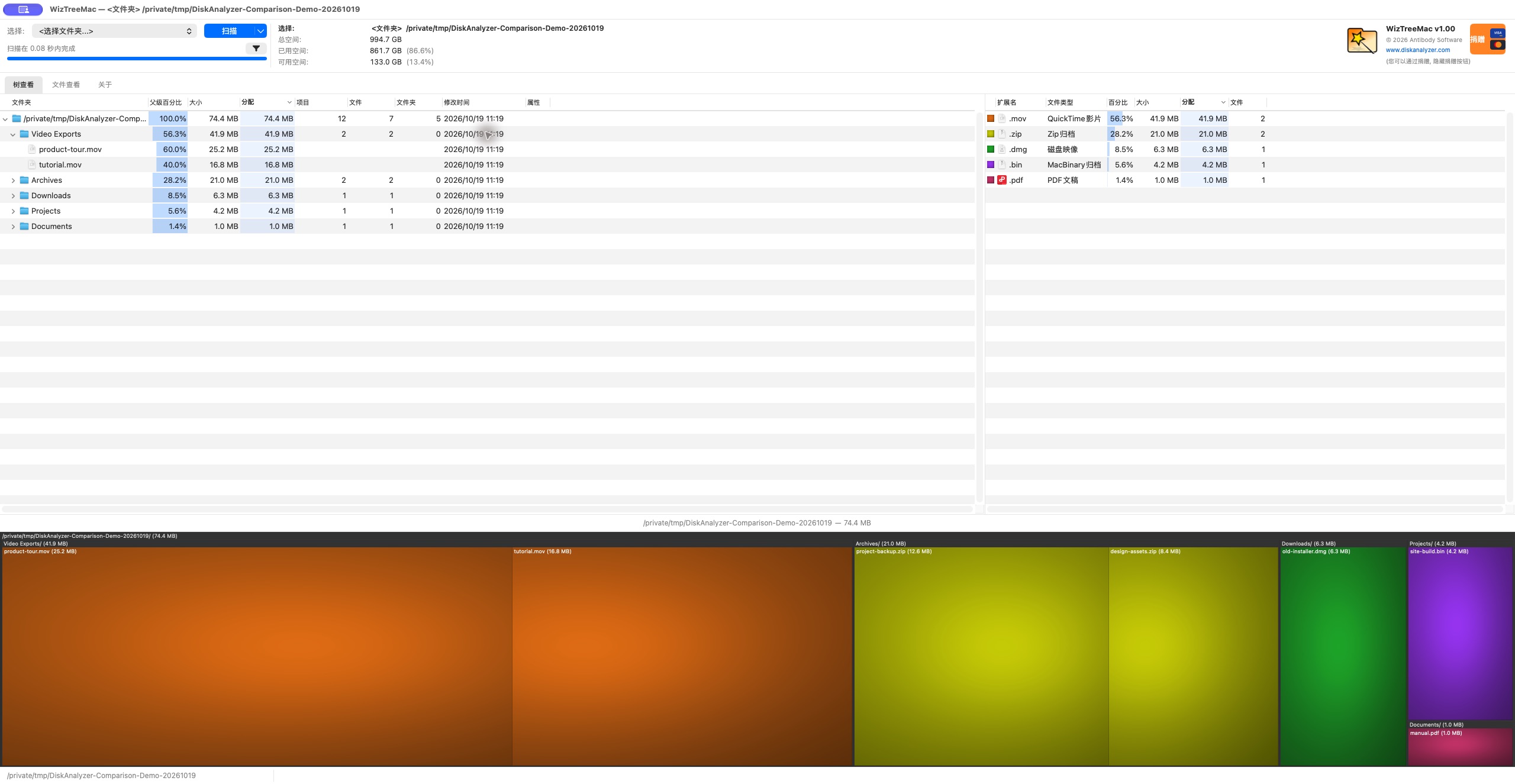
Actual WizTreeMac screenshot, with the Chinese interface shown. 树查看 is Tree View. The folder names and capacities are prepared demonstration data. Open the image to inspect the full-size interface.
If your question is “show me the larger individual files,” switch to File View. Enter a size condition in its search field. In our sample, >10m returned two video files and one archive, even though they were in different subfolders.
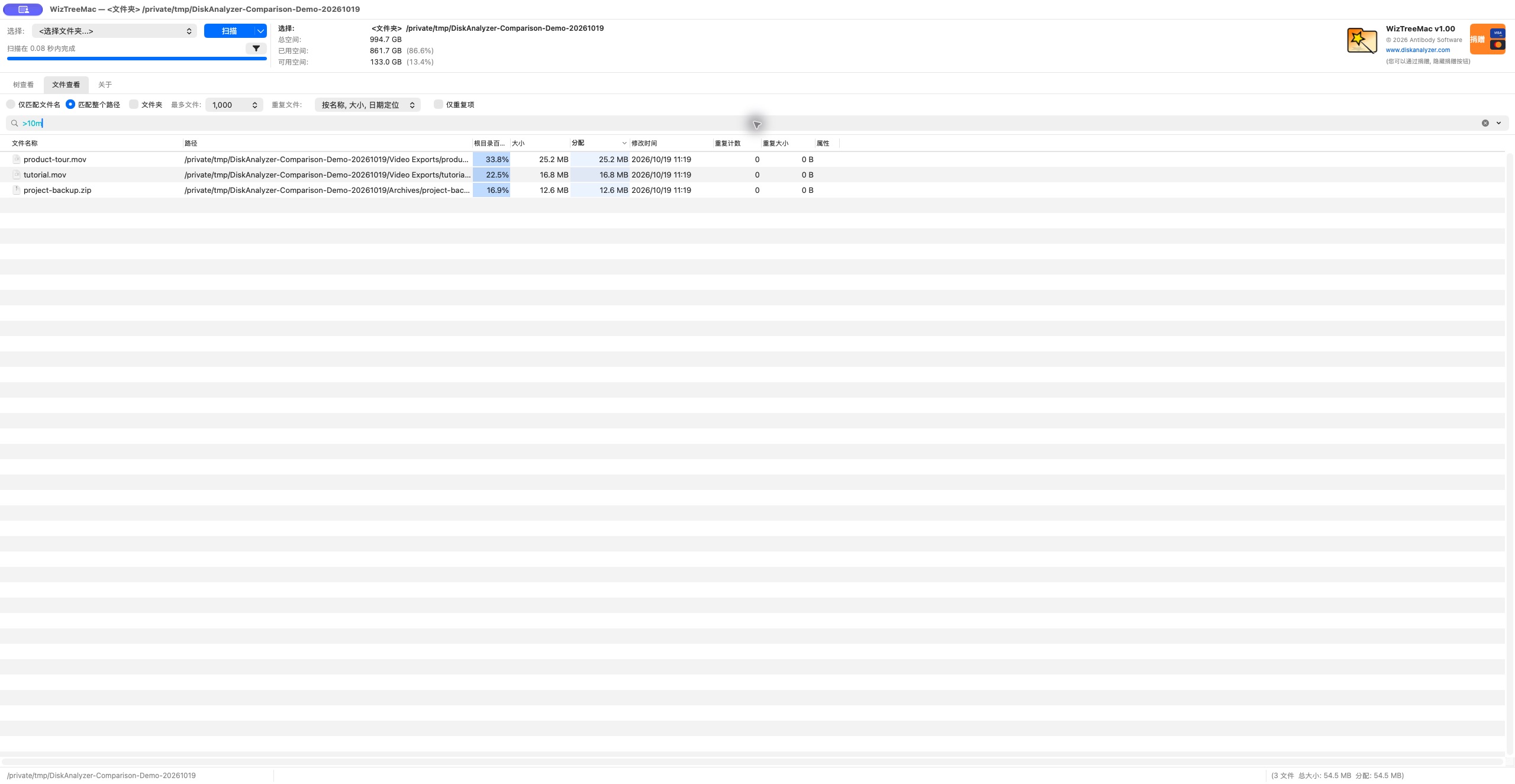
Actual screenshot of that result. 文件查看 means File View. The example explains the control; the file sizes are not a prediction of what you will find or how much space you can recover. When working with more files, check the view's Max files setting as well.
This is a concrete reason to choose WizTreeMac if your workflow depends on filtered file lists. DiskTreeSize's name search does not provide the same size-condition search.
DiskTreeSize: follow a folder and keep the map nearby
In DiskTreeSize, click Choose Location, select a folder, and click Analyze. Choose Allocated or Logical, sort the size column, and expand the largest branch.
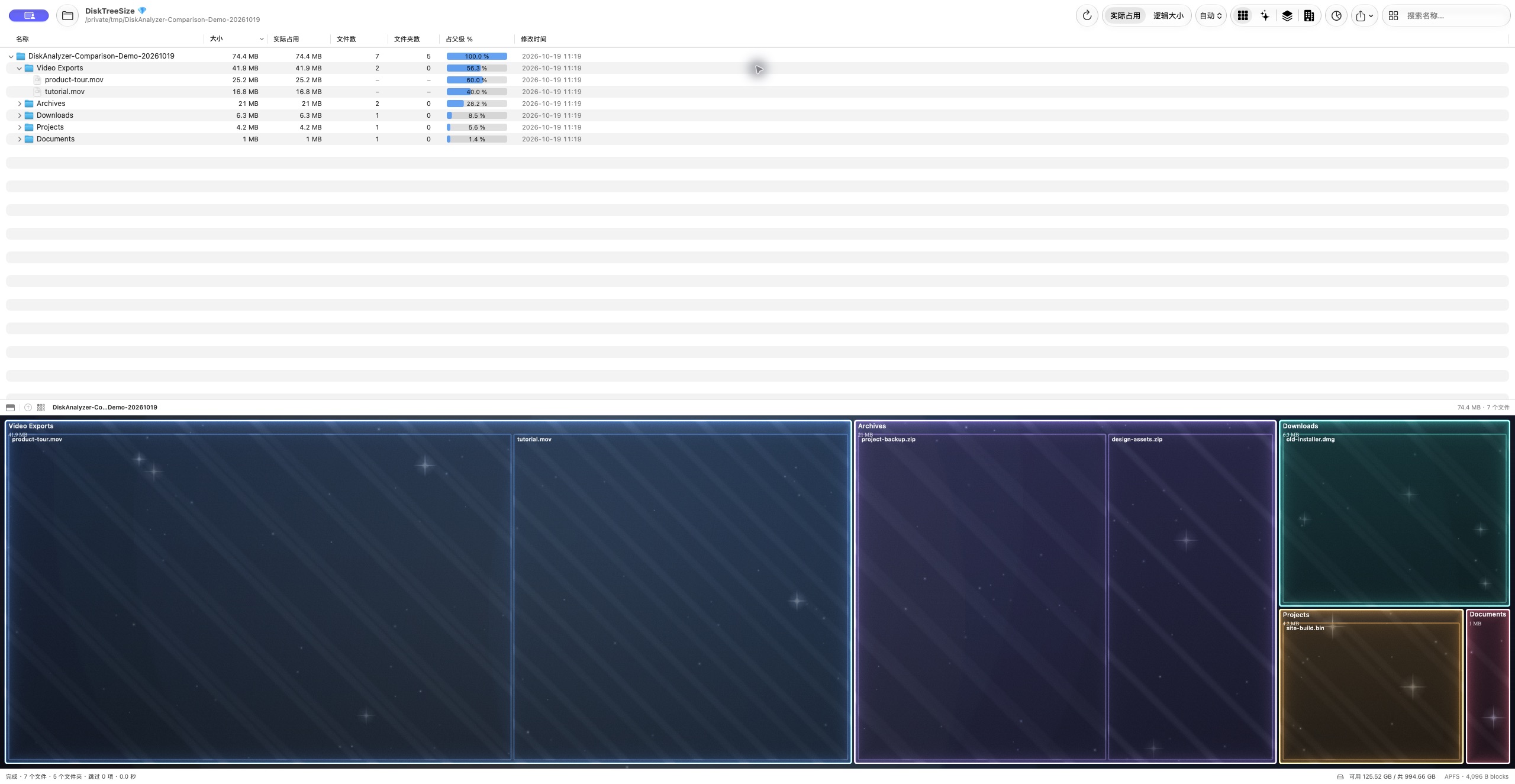
Actual screenshot of the same sample folder. 实际占用 means Allocated. Both screenshots show about 74.4 MB for this particular sample; matching one prepared folder does not establish that every disk or protected location will produce identical totals.
The free analysis includes scanning, the expandable tree, size sorting, four visual views, name search and file type statistics. Pro adds Finder navigation, CSV / JSON exports, and moves to Trash after confirmation. For the next steps, see how to find large files on Mac.
Choose by the task you do most often
Start with WizTreeMac if you want the official continuation of your Windows workflow, especially file-list filtering or an existing WizTree report workflow. It is a real Mac option, not something you need to replace merely to run on macOS.
Try DiskTreeSize if you prefer its Mac App Store distribution, folder tree and range of visual views. Its free analysis lets you inspect a familiar folder before deciding whether its Pro actions are useful to you.
For either app, a large number tells you where to investigate. Identify the file and its purpose before removing it. File length, allocated storage and the capacity actually recovered after deletion are different questions; the size measurement guide explains why.
Frequently asked questions
Is WizTree available for Mac?
Yes. Antibody Software publishes the official WizTreeMac app. The download checked on October 19, 2026 was version 1.00, requiring macOS 12 or later and supporting Apple Silicon and Intel Macs.
Is WizTreeMac free?
WizTree's official download page describes free personal use and paid licensing for commercial use. Check the current license terms for your situation. DiskTreeSize has free folder analysis and optional Pro file actions and exports.
Which app can filter a file list by size?
WizTreeMac can do this in File View; entering >10m returned three files in our prepared sample directory. DiskTreeSize's search matches names. To find large files in DiskTreeSize, sort by size and expand the folder tree.